
6 ERP Modules That Run Your Supply Chain, Vendor Agnostic


An ERP system is integrated business software that runs finance, procurement, inventory, manufacturing, and order management on a single shared database. In supply chain management, that single database becomes the answer to “what actually happened and when”: one version of stock levels, one version of purchase orders, one version of shipment status. The result is coordination across departments that would otherwise run on spreadsheets, emails, and guesswork. The rest of this guide breaks down the modules, the integrations, the implementation math, and where the technology is heading next.
TL;DR:
ERP systems provide a unified database that ensures real-time visibility and synchronization across supply chain functions, reducing errors and delays.
Most supply chains use ERP alongside specialized tools such as WMS and TMS to handle detailed execution tasks, with integration driven by APIs, middleware, or EDI.
Implementing ERP is costly and complex, with major drivers including scope size, data quality, customization level, and the number of integrations, often leading to overruns.
Deployment in the cloud is now standard, offering faster updates, scalability, and lower maintenance compared to on-premises systems, while AI and IoT enhance decision-making.
Starting with targeted automations, like order reconciliation, and proving value on a small scale helps reduce risk and resistance during ERP rollout.
Table of Contents
What Is an ERP System in Supply Chain Terms, and How Is It Different From SCM Tools?
Every ERP platform is built around one principle: a single database that every department reads from and writes to. When a warehouse worker records a receipt, finance sees the liability instantly. When sales enters an order, procurement sees the demand pull without anyone forwarding an email. SAP describes this centralization as the defining trait of ERP: integrated processes and data living in one system instead of scattered across departmental tools.
That single-database structure makes ERP the system of record for the business. It’s not, however, the deepest tool for every supply chain task. A dedicated warehouse management system will out-execute an ERP’s native inventory module on slotting logic and pick-path optimization. A transportation management system will beat ERP on carrier rate shopping and load consolidation. ERP’s job is different: it holds the master data (item numbers, supplier records, chart of accounts) and the transactional backbone that ties everything back to financial reality.
That division of labor is why most mid-size and enterprise supply chains run ERP alongside specialized platforms rather than choosing one or the other. TechTarget frames it plainly: ERP provides the system of record while purpose-built SCM tools handle detailed planning and execution.
The modules that most directly touch supply chain work typically include:
Finance and accounting, which turns every transaction into a ledger entry
Procurement and purchasing, covering requisitions, POs, and supplier records
Inventory management, tracking on-hand quantities and valuations
Manufacturing or production, including bills of materials and work orders
Order management, from quote to invoice
Human capital management, which affects labor planning in distribution centers
Smaller operations often run these natively inside the ERP. Larger or more complex networks bolt on specialist systems for the modules where depth matters most, while keeping ERP as the backbone that ties them together financially.
Core ERP Modules Mapped to Supply Chain Responsibilities
Supply chain managers rarely care about “ERP” as a category. They care about which module answers which question. Here’s how the core functions map to daily responsibilities, in the order data typically flows through them:
Demand planning. ERP pulls historical sales, seasonality patterns, and open orders to generate forecasts that feed procurement and production schedules.
Procurement and supplier management. Purchase requisitions convert to POs, supplier scorecards track on-time delivery, and contract pricing gets enforced automatically at the PO line level.
Manufacturing and MRP. Material requirements planning explodes bills of materials against forecasted demand, scheduling production runs and flagging component shortages before they stall a line.
Inventory and warehouse management. Native inventory modules handle stock counts, valuations, and reorder points; where a dedicated WMS is layered in, ERP still owns the financial valuation of that stock.
Order management and fulfillment. Orders move from entry through allocation, picking instructions, and invoicing, with each step visible to customer service and finance simultaneously.
Transportation and freight. ERP captures freight costs and carrier assignments, often handing detailed routing and load-building to a TMS while still owning the accounting for that spend.
NetSuite’s overview of ERP’s supply chain role confirms this progression: planning, procurement, manufacturing, inventory, and order management operating as connected stages rather than isolated tasks.
The value shows up in the handoffs. A demand spike detected in module one adjusts the MRP run in module three within the same data cycle, not after a weekly export gets emailed around. That’s the practical meaning of “integrated” that vendor marketing tends to gloss over: no re-keying, no version conflicts, no Thursday afternoon spent reconciling two spreadsheets that disagree.
Pro Tip: Before evaluating any ERP module, map your current data handoffs on paper first. If a task requires someone to manually copy numbers from one system into another, that’s your highest-value automation target, and it will tell you which modules actually matter for your operation.
For teams running physical logistics on tight schedules (film production crews included), the same coordination logic applies even when the “warehouse” is a truck full of camera gear. Tools built for production planning and scheduling solve a parallel problem at a smaller scale: one source of truth for who has what, where, and when.
The Measurable Benefits ERP Delivers to Supply Chains
Visibility is the benefit everyone mentions first, and it’s real: a planner who can see inventory, open POs, and in-transit shipments in one screen makes faster, better-informed decisions than one juggling five disconnected reports. But visibility alone doesn’t pay the bills. The financial case for ERP comes from three specific levers.
Automation removes manual error and manual time. Matching an invoice to a purchase order and a receiving document, three-way matching in accounting terms, is exactly the kind of task ERP eliminates. So is auto-generating a bill of lading once a shipment is confirmed. Microsoft Dynamics 365 points to this category of automation as a source of immediate, measurable ROI, precisely because these are high-volume, error-prone, low-judgment tasks that don’t need a human doing them twice.
Inventory optimization cuts both stockouts and carrying costs. When procurement, sales, and warehouse data live in the same system, reorder points reflect actual demand signals instead of stale averages. That reduces the two expensive failure modes at once: emergency freight to cover a stockout, and excess safety stock tying up working capital.
Cycle times shrink across procurement and order-to-cash. Fewer manual handoffs mean fewer delays. An order that used to take three days to move from entry to warehouse release can move in hours once approval workflows and inventory checks happen automatically inside one system.
Quantifying the exact percentage improvement a given company will see isn’t something any vendor can promise responsibly. What’s consistent across the practitioner literature is the direction: automating the routine, error-prone connective tissue of supply chain paperwork produces returns faster than almost any other ERP investment, because it targets waste that was previously invisible.
How ERP Connects to WMS, TMS, and Other Specialist Systems
ERP rarely stands alone in a mature supply chain. The practical question is how it talks to the systems doing the detailed execution work.
Two integration philosophies dominate. Embedded modules, where the ERP vendor’s own inventory or transportation functionality gets configured to handle those tasks, keep everything in one data model but sacrifice some execution depth. Best-of-breed integration, where a dedicated WMS or TMS runs the execution layer and syncs back to ERP, offers deeper functionality at the cost of an integration to maintain.
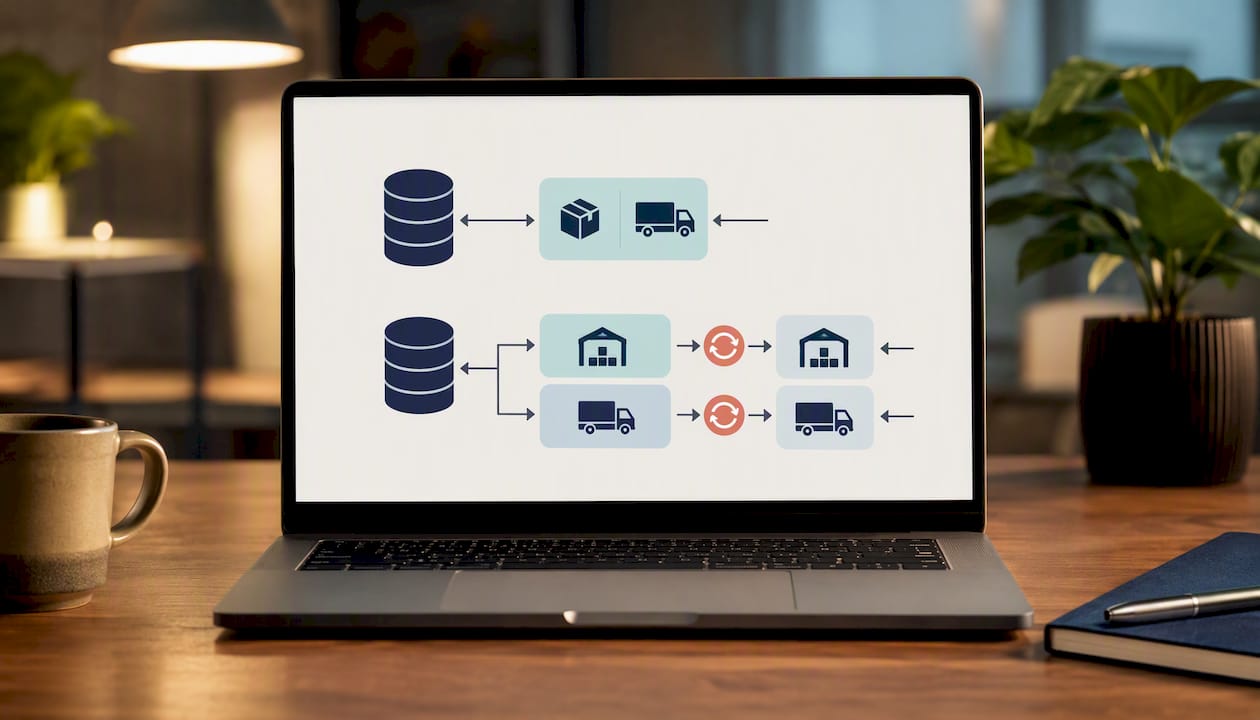
Either path requires a clear line between two very different kinds of data. Master data, item records, supplier records, units of measure, needs to be controlled centrally and treated as the single source of truth. Transactional data, shipments, receipts, inventory adjustments, moves constantly and needs to sync in near real time. Blurring that line is where most integration headaches start.
The mechanics of moving that data typically involve:
APIs for real-time, event-driven transactions between systems
Middleware or enterprise service buses to manage complex multi-system routing
EDI for structured document exchange with external trading partners
TechTarget’s analysis of ERP’s role in supply chains notes that successful deployments treat ERP as the system of record while letting WMS and TMS platforms handle planning and execution detail, with data flowing seamlessly from the warehouse floor to the general ledger.
The pitfalls tend to repeat across industries: latency between systems that causes two platforms to disagree about current stock, duplicate supplier or item records created because master data governance wasn’t enforced, and unit-of-measure mismatches (cases versus eaches, kilograms versus pounds) that throw off cost calculations silently until someone notices a margin that doesn’t add up.
What Drives ERP Implementation Cost, Timeline, and Risk
ERP projects run over budget more often than they run on budget, and the reasons are predictable enough to plan around. Five factors typically drive cost more than anything else: how many modules and locations are in scope, the number of integrations to specialist systems, the volume and cleanliness of data being migrated, how much the software gets customized versus configured out of the box, and the licensing model chosen.
A typical rollout moves through five phases:
Discovery, where current processes and data are mapped and gaps identified
Configuration, where the ERP is set up to match (not necessarily replicate) those processes
Testing, including data validation and user acceptance testing
Cutover, the go-live event itself, usually scheduled around a slower business period
Stabilization, the weeks after go-live when issues get triaged and fixed
The pitfalls that blow up timelines and budgets are consistent: over-customizing the software to match old processes instead of adapting processes to the new system, weak executive sponsorship that leaves decisions unresolved, and rolling out to end users without enough hands-on training before cutover.
Pro Tip: Pick two or three narrow automations, like PO three-way matching or automated bill-of-lading generation, and pilot them before the full rollout. Proving value on a small scale builds internal support and gives you a template for measuring ROI on the bigger investment. Microsoft’s guidance on ERP supply chain deployment points to this kind of targeted pilot as a reliable way to reduce resistance to broader change.
Cost planning deserves the same rigor supply chain teams apply to any capital project. If you’re mapping a comparable logistics budget in a different domain, the detailed cost breakdowns for video production support show how granular cost drivers, crew, permits, equipment, logistics, compound the same way ERP line items do: scope creep in any one category quietly inflates the whole project.
Where ERP Is Headed: Cloud, AI, and Real-Time Data
Cloud deployment has become the default path for new ERP implementations, and for good reason. SAP’s resources on ERP’s supply chain value point to cloud ERP as the option that gives global operations faster updates, easier scaling across new locations, and lower ongoing IT maintenance than traditional on-premises installations.
Beyond deployment model, four developments are reshaping what ERP can actually do for supply chain teams:
Scenario modeling and predictive analytics let planners test the financial impact of a supplier delay or demand spike before it happens, not after
Machine learning models built into forecasting modules catch demand anomalies that rule-based systems miss entirely
IoT sensor feeds give ERP real-time visibility into asset location and condition, not just periodic manual counts
Sustainability reporting requirements are pushing ERP vendors to consolidate supplier and logistics data well enough to support Scope 3 emissions disclosures, a challenge MIT Sloan identifies as one of the hardest parts of supply chain sustainability work
None of these features replace the fundamentals. They extend the same core idea, one accurate dataset feeding every decision, into territory that spreadsheets and disconnected tools simply can’t reach.
A Practitioner’s View on Making ERP Concepts Work in Practice
ERP earns its budget the moment two departments stop arguing about whose number is right. The theory sounds abstract until you’ve watched a production team lose a shoot day because equipment inventory in one tracker didn’t match what a vendor’s system showed. That’s a supply chain failure at small scale, and it’s the exact gap integrated data closes. Start with one automation, like matching orders to confirmations automatically, before touching anything bigger. Prove it works, then expand.
— Pieter
Sources
FAQ
What does ERP mean in supply chain management?
ERP stands for enterprise resource planning, integrated software that centralizes finance, procurement, inventory, manufacturing, and order data into one shared database so supply chain teams work from a single source of truth.
How is ERP different from a WMS or TMS?
ERP serves as the system of record for financial and master data, while a WMS handles detailed warehouse execution and a TMS manages transportation planning; most mature supply chains run all three connected together.
What are the biggest benefits of ERP in supply chain management?
The clearest gains are unified visibility across departments, automation of manual tasks like invoice matching, reduced inventory carrying costs, and shorter order-to-cash cycles.
Is cloud ERP better than on-premises for supply chain operations?
Cloud ERP typically offers faster updates, easier scaling across new locations, and lower IT maintenance, which makes it the more common choice for supply chains operating across multiple regions.
What usually causes ERP implementations to fail or run over budget?
Over-customizing the software to match outdated processes, weak executive sponsorship, and insufficient user training before go-live are the most frequently cited causes of ERP projects missing their timeline or budget.
Recommended
