
Working From Home Effectively: 12 Systems That Stick


Here is the short version — a checklist you can start using today. Each item is tagged by how long it takes to set up.
Set a 90-minute deep-work block before checking email or Slack. (5 min to schedule)
Create a 3-step morning ritual (get dressed, make coffee, open your task list). (30 sec to decide)
Turn off all non-essential push notifications on your phone and computer. (2 min to toggle)
Define your core work hours and share them with your team and household. (5 min to send)
Write a “next steps” note at the end of every workday before closing your laptop. (30 sec habit)
Place a physical signal (a lamp, a specific mug, a desk mat) that marks “work mode.” (30 sec)
Block your lunch break as a calendar event so it cannot be booked over. (2 min)
Set a response-time agreement with your team: chat within a few hours, email by end of day. (5 min to send)
Run a 30-minute weekly review every Friday afternoon. (30 min, once a week)
Add an external monitor if you spend more than four hours a day on calls or documents. (30 min to set up)
Priority habit to try this week: Write your “next steps” note at the end of today’s workday and close your laptop immediately after. That single act is the fastest way to stop work from bleeding into your evening.
Key Takeaways
The most reliable path to working from home effectively is structural: design your environment, schedule, and team norms so that focus becomes the default, not the exception.
Point | Details |
Spatial separation drives focus | A dedicated workspace, even a corner desk, cues work mode and sharpens the boundary between work and rest. |
Rituals replace the commute | A 3-step morning startup and a 5-minute shutdown ritual create the psychological transitions that remote work removes. |
Protect deep-work blocks | Schedule 90-minute focus blocks as calendar events and treat them as non-negotiable meetings. |
Interruptions are costly | Each interruption can require roughly 23 minutes of recovery time; notification management and response-time agreements protect that capacity. |
One experiment at a time | Pick one structural change, run it for two weeks, and measure a single personal metric before adding anything else. |
Table of Contents
1. How to set up a dedicated workspace that reliably cues work mode
2. Build a reliable daily structure with morning startup and shutdown rituals
3. Time-management systems that produce sustained deep work at home
4. How to eliminate attention leaks from notifications, environment, and habit traps
5. Which channel to use for what, and how to prevent meeting overload
6. Protect your energy and prevent burnout with breaks, movement, and clear household boundaries
7. A weekly review template that keeps work from bleeding into home life
8. Small tech and gear upgrades that give the biggest returns
9. A quick security checklist and professional practices for home work
10. Why these systems work: the research behind routines, blocks, and boundaries
1. How to set up a dedicated workspace that reliably cues work mode
The single most reliable tip for working from home effectively is spatial separation. Your brain associates locations with behaviors. When you work from the couch, your nervous system never fully shifts into focus mode because that spot already signals rest. A dedicated corner, even a small one, changes that.
You do not need a separate room. A corner desk facing a wall, a specific chair you only sit in during work hours, or even a folding table you set up and pack away each day can create the boundary your brain needs. The key is consistency: the same spot, every workday.
For equipment, three upgrades deliver the clearest returns. Noise-cancelling headphones block ambient household noise without requiring you to negotiate silence with everyone in the building. An external monitor reduces the eye strain and cognitive friction of working on a small laptop screen for hours. A daylight-spectrum desk lamp placed at eye level reduces glare and keeps your circadian rhythm stable, especially during winter months when natural light is scarce. Microsoft’s remote-work guidance lists a dedicated workspace and the right equipment as foundational practices, not optional upgrades.
One underrated signal: a “startup object.” This is a physical item you place on your desk only when you are working — a specific notebook, a small plant, a branded mug. Picking it up becomes a micro-ritual that tells your brain the workday has begun. PCMag’s remote-work guide reinforces this kind of behavioral cue, noting that dressing for work and setting up a consistent space are among the most effective habit anchors for remote workers.
Pro Tip: If you share a space with others, a simple visual signal — a small desk lamp switched on, or a “Do Not Disturb” sign on the back of your chair — communicates focus time without requiring a conversation every morning.
For creative professionals managing complex production workflows, the same spatial logic applies. Videoproductionswitzerland’s full-service production support is built on the same principle: reliable structure removes guesswork so you can focus on the work itself.
2. Build a reliable daily structure with morning startup and shutdown rituals
Structure replaces the commute. That 20-minute drive or train ride used to serve a psychological function: it created a transition between “home self” and “work self.” Without it, remote workers often slide into work still half-asleep and slide out of it without ever fully stopping. The fix is a deliberate ritual at both ends of the day.
Sample morning startup (5 minutes total):
Get dressed as if you are going to an office.
Make your coffee or tea and take it to your desk.
Open your task list and identify the single most important task for the morning.
Set a timer for your first 90-minute deep-work block.
Close email and Slack until the block ends.
Sample shutdown ritual (5 minutes total):
Review what you completed against your task list.
Write a “next steps” note: three to five specific tasks for tomorrow.
Close all work tabs and applications.
Send a brief end-of-day message to your team if your norms require it.
The shutdown ritual is backed by solid evidence. The mechanism is simple: your brain keeps rehearsing unfinished tasks until it trusts they are captured somewhere. Writing them down provides that assurance. Structural interventions like these — morning routines, dedicated workspace, shutdown rituals — reliably improve both focus and the psychological separation between work and rest.
For core hours, pick a window that overlaps with your team’s peak availability and protect it. Share it in your calendar and in your Slack status. Housemates and family members respond better to a visible schedule than to ad-hoc requests for quiet.
Pro Tip: Keep your “next steps” note in a physical notebook rather than a digital app. The act of writing by hand reinforces the psychological close of the workday more effectively than typing.
3. Time-management systems that produce sustained deep work at home
The most effective remote workers treat their 90-minute deep-work blocks the way they treat client meetings: non-negotiable, visible on the calendar, and protected from interruption. Energy-based scheduling — placing your most cognitively demanding work during your personal peak hours — is one of the highest-leverage adjustments you can make.

Three techniques dominate the conversation on remote time management. Here is how they compare across practical dimensions:
Technique | Best use case | How to set it up | Main pitfall |
Time-blocking | Deep work, creative tasks, writing | Block 90 min slots in your calendar; label them by task type | Over-scheduling leaves no buffer for the unexpected |
Pomodoro | Tasks requiring sustained but interruptible focus | Set a timer for work and break cycles; repeat four cycles | Too short for complex creative or analytical work |
Task batching | Admin, email, calls, reviews | Group similar tasks into one block (e.g., all calls between 2–4 PM) | Requires discipline to resist mixing task types |
For most knowledge workers, time-blocking is the most reliable system for effective time management at home. Pomodoro works well for tasks that have clear stopping points. Batching is most powerful when combined with time-blocking: reserve one block for deep work, one for communication, one for admin.
A simple calendar rule: mark your deep-work blocks as “Busy” with a visible label like “Deep Work — No Meetings.” When teammates can see your focus windows, they learn to route non-urgent questions to async channels instead of interrupting you.
Pro Tip: Schedule your hardest task in your first deep-work block of the day, before decision fatigue sets in. Most people do the opposite — they warm up with email and save the hard work for later, when their cognitive resources are already depleted.
4. How to eliminate attention leaks from notifications, environment, and habit traps
The average knowledge worker experiences frequent interruptions throughout the day, each requiring significant time to regain full focus. That math is brutal: even a handful of unnecessary pings can consume the better part of a productive morning.
Top attention leaks and the immediate fix for each:
Phone notifications: Turn off all non-essential push notifications. Keep only calls and calendar alerts on.
Email open in background: Close your email client during deep-work blocks. Check it in batches, twice a day.
Slack/Teams pings: Set your status to “Do Not Disturb” during focus blocks. Use scheduled availability hours.
Browser tab overload: Use a separate browser profile for work. Install a site blocker (Freedom, Cold Turkey, or a built-in focus mode) during deep-work sessions.
Household interruptions: Agree on visual signals with housemates (closed door, headphones on) that mean “not available.”
Phone within reach: Move your phone to another room or face-down in a drawer during focus blocks. Proximity alone is enough to reduce concentration.
A response-time agreement with your team removes the anxiety that drives constant checking. When everyone knows that chat messages get a response within a few hours and emails by end of day, there is no social pressure to monitor every channel in real time. Asana’s remote-work guide recommends setting explicit communication norms as one of the most effective ways to protect focus and prevent overwork.
Site blockers are worth using for high-resistance tasks. Freedom and Cold Turkey both allow you to schedule recurring block sessions, so you do not have to make the decision to focus every morning — the tool enforces it automatically.
5. Which channel to use for what, and how to prevent meeting overload
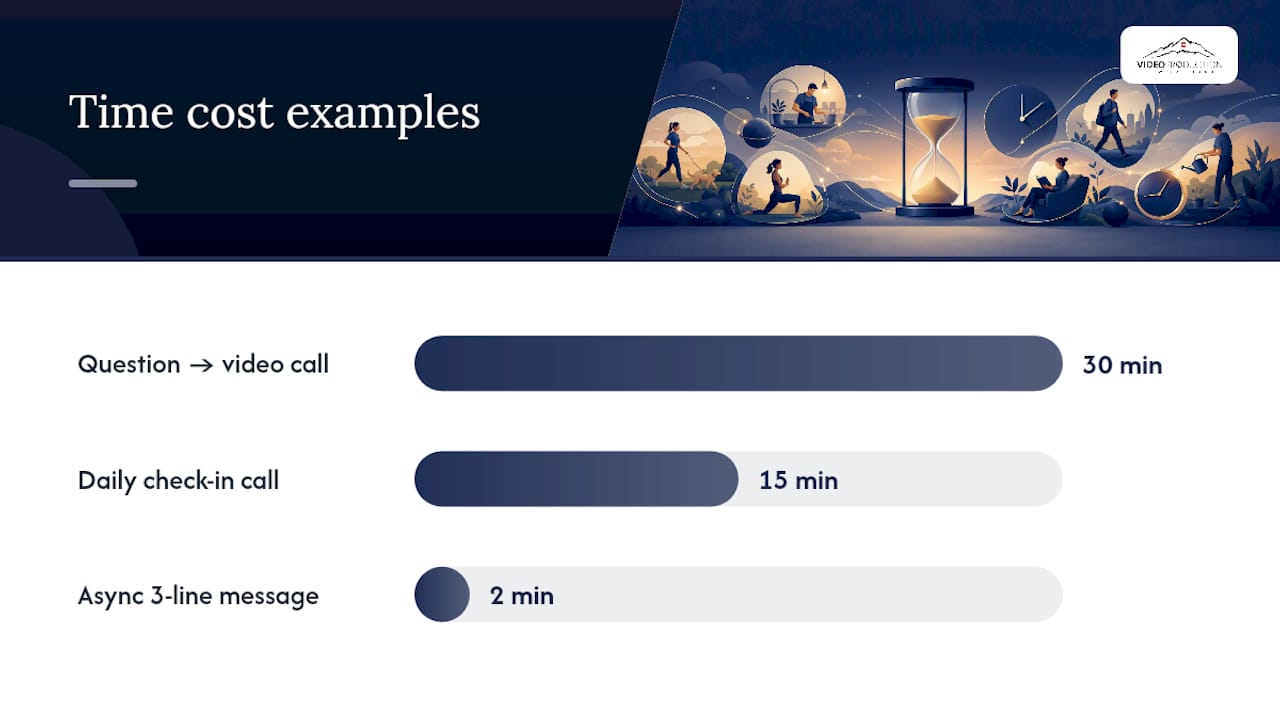
Choosing the wrong channel for a task is one of the most common hidden costs of remote work. A question that belongs in a two-line async message becomes a 30-minute video call. A decision that needs live input gets buried in a 40-message Slack thread. Mapping channels to job types solves this.
Channel | Best for | Avoid using it for |
Formal records, external communication, summaries | Real-time decisions, quick clarifications | |
Chat (Slack/Teams) | Quick clarifying questions, status updates | Long explanations, sensitive feedback |
Async docs (Notion, Loom) | Explanations, walkthroughs, proposals | Urgent decisions |
Video call | Decisions needing live input, relationship-building | Status updates, announcements |
Before scheduling any meeting, run it through a short checklist:
Is there a written agenda with a clear desired outcome?
Are the right people (and only those people) invited?
Could this be handled with a short async message or recorded walkthrough instead?
Is there a hard time limit and a buffer before the next call?
High-performing remote teams deliberately keep their synchrony ratio low — meaning most communication happens asynchronously, and live calls are reserved for decisions that genuinely require real-time input. Daily standups work well as a three-line async message: what you did yesterday, what you are doing today, any blockers. This format takes two minutes to write and eliminates the need for a daily 15-minute check-in call.
Pro Tip: Record a short Loom walkthrough instead of scheduling a meeting whenever you need to explain a process or share context. It takes the same amount of time to record as it would to explain live, and teammates can watch it at their own pace.
For teams managing remote video production workflows, structured async communication is especially critical. Videoproductionswitzerland’s guidance on managing remote production teams covers how to apply these norms in creative and production contexts.
6. Protect your energy and prevent burnout with breaks, movement, and clear household boundaries
Remote workers consistently underestimate how much the absence of natural movement breaks affects their focus. In an office, you walk to meetings, grab coffee from a shared kitchen, and chat with colleagues in the hallway. At home, you can go hours without standing up. Research summarized by HBR shows that good-quality breaks produce measurable improvements in attention and wellbeing — but the quality of the break matters as much as its length.
A practical break schedule:
Every 60–90 minutes: A 5-minute micro-break. Stand up, stretch, look out a window. Do not check your phone.
Midday: A 20–30 minute walk outside. Natural light and movement reset your focus more effectively than a longer sit-down lunch at your desk.
Afternoon: A 10-minute break away from screens before your final work block.
Consistent sleep is the foundation everything else rests on. CDC guidance recommends 7 or more hours of sleep per night for adults, linking adequate sleep directly to cognitive performance and decision-making quality. A shutdown ritual that ends at a consistent time protects your sleep schedule as much as it protects your evenings.
For household boundaries, the most reliable tactics are:
Agree on quiet hours with housemates or family at the start of the week, not in the moment.
Use a shared household calendar so your core work hours are visible to everyone.
Create a physical signal (closed door, headphones on) that means “do not interrupt unless urgent.”
Scheduled social contact matters too. Remote work can feel isolating, and isolation compounds over weeks. Block time for a weekly virtual coffee with a colleague, or join a virtual coworking session for high-resistance tasks.
Pro Tip: Body-doubling — working silently on a video call with a colleague — is one of the most effective tools for tasks you keep avoiding. The social presence increases accountability without requiring any conversation.
7. A weekly review template that keeps work from bleeding into home life
A weekly review is the structural habit that prevents tasks from falling through the cracks and stops Sunday-evening anxiety from becoming your default. It takes 30–45 minutes and pays back far more than that in clarity.
Step-by-step weekly review:
Review wins. List three things you completed or moved forward this week. This is not optional — it recalibrates your sense of progress.
Capture carryovers. What did not get done? Move it to next week’s list or delete it if it no longer matters.
Set priorities for next week. Identify your top three outcomes, not tasks. What would make next week a success?
Check your calendar. Are your deep-work blocks in place? Are there meetings that could be async instead?
Run one experiment. Pick one small change to test next week (a new time for your deep-work block, a different break schedule, a new async format).
The experiment step is the one most people skip, and it is the one that drives continuous improvement. Treating your work setup as something to iterate on — rather than a fixed arrangement — is what separates remote workers who thrive from those who plateau.
For production professionals managing cross-time-zone workflows, a weekly review also serves as a coordination checkpoint. Videoproductionswitzerland’s resource on time management for global media teams offers additional tactics for aligning distributed schedules.
8. Small tech and gear upgrades that give the biggest returns
Most home office setups underperform not because of missing software, but because of friction in the physical environment. A few targeted hardware upgrades remove that friction reliably.
The highest-return categories:
External monitor: Reduces the cognitive load of switching between windows on a small screen. A 24–27 inch monitor at eye level also improves posture by eliminating the neck-down angle of laptop use.
Noise-cancelling headphones: Block ambient household noise during calls and focus blocks. Over-ear models with active noise cancellation outperform earbuds for long sessions.
Mechanical or low-travel keyboard: Reduces typing fatigue during long writing sessions. The tactile feedback also reinforces the “work mode” signal.
Daylight desk lamp: A lamp with a color temperature of 5000–6500K mimics natural daylight and reduces eye strain during evening work sessions.
Webcam with decent low-light performance: Built-in laptop cameras perform poorly in dim rooms. A dedicated webcam with autofocus and low-light compensation makes a visible difference in how you appear on calls.
When buying any of these, check three things before purchasing: compatibility with your existing setup, the return policy (ergonomic fit is personal and hard to judge from a product page), and whether the warranty covers the failure modes most likely for your use case (headphone hinges, cable connectors).
Pro Tip: Before buying new gear, audit your current setup for one week. Note every moment of physical friction — a chair that causes back pain by 2 PM, a screen that requires you to squint, a microphone that picks up HVAC noise. Buy to fix specific friction points, not to upgrade for its own sake.
9. A quick security checklist and professional practices for home work
Home networks and personal devices introduce security risks that a managed office environment handles automatically. A short checklist covers the essentials without requiring an IT background.
Security basics:
Keep your operating system and applications updated. Most breaches exploit known vulnerabilities that patches already fix.
Use a password manager (1Password, Bitwarden, or Dashlane) to generate and store unique credentials for every account.
Enable automatic screen lock after 2–3 minutes of inactivity.
Create a separate user profile or browser profile for work, keeping personal browsing and work accounts isolated.
Connect to a VPN when accessing company systems, especially on shared or public Wi-Fi.
Video-call etiquette:
Check your background before joining. A neutral wall or a simple virtual background is more professional than a cluttered room.
Position your light source in front of you, not behind. A window behind you turns you into a silhouette.
Mute yourself when not speaking. Background noise is distracting and signals inattention.
Include a brief agenda and a desired outcome in every meeting invite you send.
When family members or housemates are present, be mindful of what is visible on your screen and audible in your calls. A quick scan of your background before joining a client call takes five seconds and avoids an awkward moment.
10. Why these systems work: the research behind routines, blocks, and boundaries
The core claim is straightforward: structural interventions outperform motivational hacks. Telling yourself to “focus harder” or “be more disciplined” produces short-term effort and long-term exhaustion. Designing your environment, schedule, and team norms to make focus the path of least resistance produces durable results.
Evidence compiled across remote-work research shows that morning routines, dedicated workspaces, time-blocking, and shutdown rituals each produce measurable improvements in focus and in the psychological separation between work and rest. These are not soft productivity tips — they are structural changes that reduce the number of decisions your willpower has to make each day.
The interruption data is the most striking piece of evidence. The average knowledge worker faces approximately 77 interruptions per day, with each one requiring roughly 23 minutes of recovery time to regain full focus. Protecting even two 90-minute blocks per day from interruption can recover hours of productive capacity that would otherwise be lost to context-switching.
Structural intervention | Primary mechanism | Key benefit |
Dedicated workspace | Spatial association cues work mode | Faster entry into focus; clearer off-hours boundary |
Morning startup ritual | Replaces commute transition | Reduces ramp-up time; sets daily intention |
Time-blocking | Protects cognitive resources | Defends deep work from reactive tasks |
Shutdown ritual | Transfers tasks to external list | Reduces evening rumination; protects sleep |
Response-time agreements | Removes social pressure to monitor constantly | Enables sustained focus blocks |
The practical implication: pick one structural change from this list and run a two-week experiment. Measure one personal metric — uninterrupted deep-work hours per day, or the number of evenings you spend without thinking about work. Two weeks is long enough to see a real signal and short enough to stay honest about whether it is working.
Pro Tip: Track your experiment in a simple daily note: “Did I protect my morning block? Yes/No. Did I complete my shutdown ritual? Yes/No.” Consistency data is more useful than outcome data in the first two weeks.
11. A practitioner’s perspective on what actually sticks
The systems in this article are not theoretical. They are the ones that survive contact with real remote work — the kind where your internet drops during a client call, your child walks in during a presentation, and your “deep-work block” gets eaten by a last-minute request before you even open your task list.
What I have found, after years of working across distributed teams and production environments, is that the people who thrive remotely are not the ones with the most sophisticated setups. They are the ones who protect two or three non-negotiable habits and let everything else flex. The morning ritual and the shutdown ritual are the two I would defend above all others. Everything else — the Pomodoro timer, the weekly review, the channel map — is useful scaffolding, but those two rituals are load-bearing.
The realistic advice on adoption: do not try to implement all of this at once. Pick the one habit that addresses your biggest current pain point. If evenings feel contaminated by work, start with the shutdown ritual. If mornings feel chaotic, start with a three-step startup. Run it for two weeks before adding anything else. Habit change that compounds slowly is more reliable than a full system overhaul that collapses by Thursday.
Sources
The following resources informed this article and are worth reading in full if you want the evidence and deeper how-to behind any section.
For readers managing professional video production workflows remotely, Videoproductionswitzerland’s production support services and video production FAQ cover the logistics, crew coordination, and planning systems that keep complex shoots on track.
Recommended
